Choose a useful cart experience#
Open in the editor Theme settings → General; Overlay → Cart drawer
Choose the cart presentation before adding optional incentives.
- Choose whether to use the cart drawer in General.
- Open Cart drawer to review its messages and supporting content.
- Make any shipping threshold agree with your actual shipping rules.
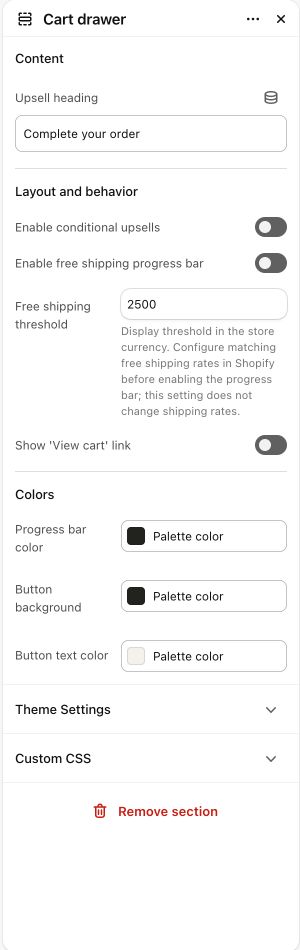
What to look for The cart explains the selected products and next step clearly. Shipping messages match the store rules.
Choose the cart behavior#
- Open Theme settings → General and review Use cart drawer.
- Open the Cart drawer in the shared Overlay group to configure its content and optional upsells/progress display.
- Preview the cart page template separately; it is distinct from the drawer.
- Test adding, changing quantity, removing, an empty cart and an inventory error.
Free shipping progress#
Enable the progress bar and enter your actual threshold in Cart drawer. The visual incentive is hidden for empty or non-shippable-only carts in the current implementation. The message is a storefront display: configure the matching shipping rate/rules in Shopify. It does not grant free shipping by itself.
Currency and thresholds#
The threshold is a configured number converted for the progress calculation, not a live shipping-rate query. Review currency/market behavior and checkout eligibility for each market you sell to; do not assume one threshold matches all market pricing or shipping profiles.
Checkout remains Shopify#
Taxes, delivery rates, payment methods, customer identity and checkout rules are managed by Shopify and your connected services. Avoid promising a delivery or payment option based only on a cart message.